
Stop manually reviewing vendor files.
Vendor Complete uses AI-assisted review to identify missing, expired, and incomplete vendor documents—so your team can focus only on the files that need attention.
Sample Vendor File Report
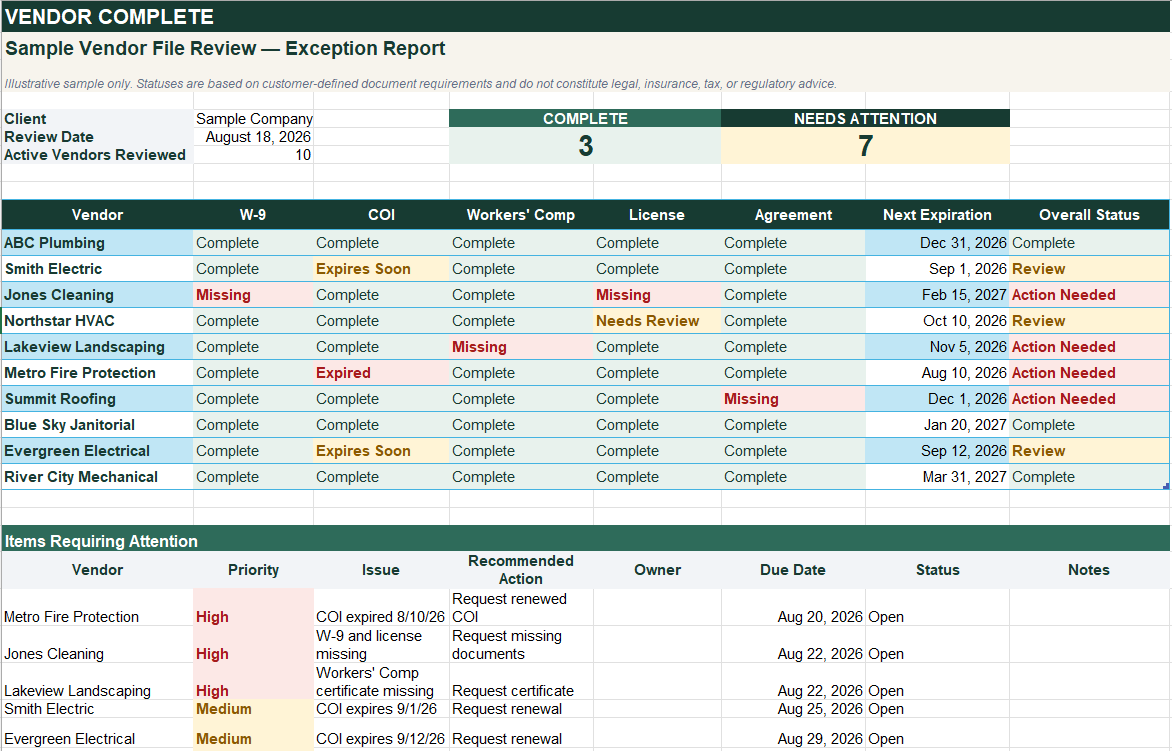
Review the exceptions — not every file.
How It Works
A simple three-step process
Step 1: Tell us about your vendor files
Complete a short assessment describing your vendor population, document requirements, and current process.
No confidential documents are requested at this stage.
Step 2: Approve the review
We'll confirm the scope, pricing, and service terms. Once accepted, you'll receive access to your private secure upload area.
Step 3: Receive your Vendor File Report
Vendor Complete reviews the documents against your stated requirements and identifies missing, expired, incomplete, and attention-needed items.
Services

Vendor File Review
One-time
Get a clear picture of what your vendor files contain—and what needs attention.
Depending on your scope, your review may include:
AI-assisted document identification
missing-document identification
expiration-date extraction
document-status review
exception report
master vendor status report
human review of flagged exceptions
Starting at $499

Vendor File Monitoring
Recurring
Keep new, renewed, and expiring vendor documents reviewed throughout the year.
Includes:
review of newly received documents
review of replacement documents
expiration monitoring
monthly exception report
updated file status
Starting at $399 per month based on vendor count and document volume
Who It’s For?
Built for teams managing vendor documents manually.
Vendor Complete is designed for businesses managing dozens to hundreds of vendors through email, shared folders, spreadsheets, or accounting systems—without a dedicated vendor-document team.
Typical businesses and teams we commonly serve:
Property & Facilities
Construction & Field Services
Multi-Location Businesses
Operations & Finance Teams
Why Vendor Complete Works?
Without Vendor Complete
Open every document
Find every expiration date
Update spreadsheets manually
Figure out what's missing
Review the same information repeatedly
With Vendor Complete
Send files securely
AI-assisted review does the first pass
Exceptions are identified
Your team reviews only what needs attention
Receive a clear status report
Security and Data Handling
Vendor documents are submitted only after service terms are accepted and through a secure upload process. Vendor Complete uses documents solely to perform the requested review and limits access to authorized systems and personnel.